ABDiff ships with a command-line tool (abd) for opening
comparisons/merges and for CI image comparisons.
Installation
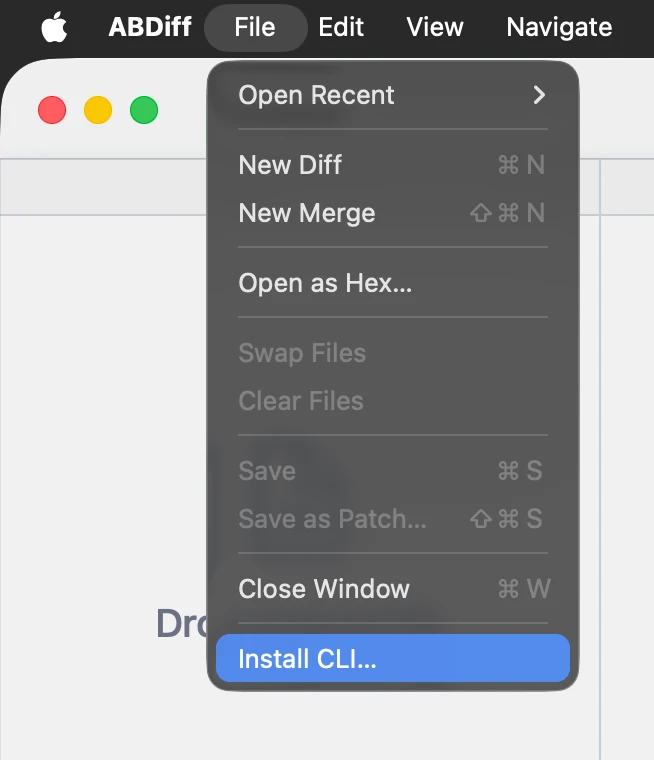
- Choose File ▸ Install CLI….
- Pick an installation folder.
- Add that folder to your
PATHsoabdis available in Terminal.
PATH Editing
How to add a folder to the PATH:
- Edit startup file.
nano ~/.zshrc- Add this line and save:
export PATH="$HOME/installation/folder:$PATH"- Reload the startup (or restart the shell).
source ~/.zshrcQuick CLI Usage
These are examples of common CLI operations.
# Open one file in the app
abd left.txt

# Open two files (ABDiff infers viewer mode)
abd left.txt right.txt

# Explicit two-way compare
abd --local left.txt --remote right.txt

# Explicit three-way merge
abd --base Base.txt --local Ours.txt --remote Theirs.txt --result Merged.txt

# Compare images in CI (no UI)
abd image left.png right.png --metric ssim --threshold 0.98

# Launch without blocking
abd --no-wait left.txt right.txt

# Print CLI version
abd version
Running abd image prints a score and exits 0 when
similar (within threshold), or 1 when different.